
Messy SQL is one of the fastest ways to slow down a development team. When queries are crammed into a single line with inconsistent casing and no indentation, debugging takes longer, code reviews stall, and mistakes slip through. Learning to properly format SQL is one of the simplest improvements you can make to your database workflow — and it pays off immediately in readability, collaboration, and fewer errors.
SQL remains one of the most widely used languages in software development. According to the 2024 Stack Overflow Developer Survey, over 54% of professional developers use SQL regularly, making it the third most popular programming language after JavaScript and HTML/CSS. With that many people writing queries every day, the difference between well-formatted and poorly formatted SQL has a real impact on productivity across teams, companies, and entire industries.
This guide covers everything you need to know about SQL formatting: the core rules, common mistakes, practical examples, and how to use an online SQL formatter to clean up your queries instantly. Whether you are a data analyst writing ad-hoc reports, a backend developer building application queries, or a DBA optimizing production databases, properly formatted SQL will make your work faster and more reliable.
Table of Contents
Why SQL Formatting Matters
SQL is a declarative language — you tell the database what data you want, not how to get it. That flexibility is powerful, but it also means two developers can write functionally identical queries that look completely different. Without consistent formatting, SQL codebases become difficult to read, harder to debug, and risky to modify.
Here is why taking the time to format SQL properly is worth it:
Readability. A well-formatted query makes its logic visible at a glance. When each clause sits on its own line and conditions are properly indented, you can scan a 50-line query in seconds instead of mentally parsing a wall of text. This matters especially in production environments where you may need to diagnose a slow query under pressure.
Collaboration. In team environments, SQL is rarely written once and never touched again. Other developers need to read your queries, modify them, and build on them. When everyone on a team agrees to format SQL the same way, onboarding time decreases and code reviews become significantly more efficient. The Simon Holywell SQL Style Guide, one of the most widely referenced formatting standards, reinforces this by providing a shared set of rules teams can adopt immediately.
Debugging. When a query returns unexpected results, properly formatted SQL lets you isolate each clause individually. You can quickly identify whether the issue is in a JOIN condition, a WHERE filter, or a GROUP BY clause. With unformatted SQL, you are essentially reading one long sentence and hoping you spot the error. Taking the time to format SQL before debugging can cut troubleshooting time dramatically.
Version control. If your team uses Git or another version control system, choosing to format SQL with each column and condition on its own line produces cleaner diffs. A change to one filter shows as a single-line diff instead of a rewrite of an entire block. This makes pull request reviews faster and more accurate.
Core SQL Formatting Rules Every Developer Should Follow
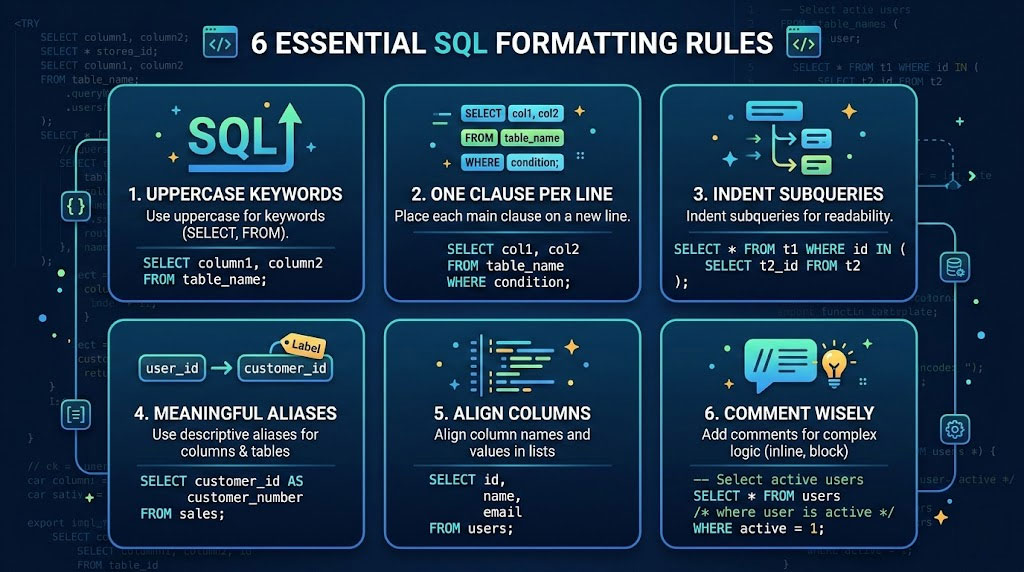
While there is no single official SQL formatting standard, the developer community has converged on a set of widely accepted best practices. These rules work across MySQL, PostgreSQL, SQL Server, Oracle, and SQLite. If you follow them consistently, your queries will be readable by virtually any database professional.
Uppercase SQL Keywords
Write all SQL keywords in uppercase: SELECT, FROM, WHERE, JOIN, GROUP BY, ORDER BY, HAVING, INSERT, UPDATE, DELETE, and so on. Keep table names, column names, and aliases in lowercase or snake_case. This visual separation makes it immediately clear which parts of the query are structural keywords and which are your data references.
-- Good: Keywords stand out clearly
SELECT
    customer_id,
    first_name,
    order_total
FROM orders
WHERE status = 'active';

-- Bad: Everything blends together
select customer_id, first_name, order_total from orders where status = 'active';
Place Each Major Clause on Its Own Line
Every major SQL clause — SELECT, FROM, WHERE, JOIN, GROUP BY, HAVING, ORDER BY, and LIMIT — should start on a new line. This is the single most impactful formatting rule. It transforms a dense block of text into a structured, scannable layout. When you format SQL this way, the logical flow of data becomes visible: what you are selecting, where it comes from, how it is filtered, and how it is sorted.
SELECT
    p.product_name,
    c.category_name,
    SUM(oi.quantity) AS total_sold
FROM order_items AS oi
INNER JOIN products AS p
    ON oi.product_id = p.id
INNER JOIN categories AS c
    ON p.category_id = c.id
WHERE oi.order_date >= '2025-01-01'
GROUP BY p.product_name, c.category_name
ORDER BY total_sold DESC
LIMIT 20;
Indent Subqueries and Conditions
Indentation communicates hierarchy. Columns listed after SELECT should be indented one level. JOIN conditions (the ON clause) should be indented beneath the JOIN. Subqueries and Common Table Expressions (CTEs) should use additional indentation to show nesting depth. A standard indent of 4 spaces works well for most teams.
SELECT
    e.employee_name,
    e.department,
    e.salary
FROM employees AS e
WHERE e.salary > (
    SELECT AVG(salary)
    FROM employees
    WHERE department = e.department
)
ORDER BY e.salary DESC;
Use Meaningful Table Aliases
When joining multiple tables, use short but meaningful aliases. Single-letter aliases like o for orders and c for customers work well for simple queries. For more complex queries involving many tables, slightly longer aliases like ord and cust prevent confusion. Always use the AS keyword when defining aliases to make the intent explicit.
-- Clear aliases with AS keyword
SELECT
    c.name AS customer_name,
    o.order_date,
    o.total AS order_total
FROM customers AS c
INNER JOIN orders AS o
    ON c.id = o.customer_id;
Align Selected Columns Vertically
When your SELECT statement includes more than two or three columns, list each column on its own line. This makes it easy to see exactly which fields the query returns, and adding or removing a column only touches one line — which keeps version control diffs clean. Place commas at the end of each line (trailing commas) or at the beginning of the next line (leading commas), depending on your team’s convention. The important thing is consistency.
-- Trailing commas (more common)
SELECT
    user_id,
    first_name,
    last_name,
    email,
    created_at
FROM users;

-- Leading commas (popular in analytics)
SELECT
    user_id
    , first_name
    , last_name
    , email
    , created_at
FROM users;
Comment Wisely
Good SQL comments explain why something is done, not what is being done. The query itself should be readable enough to show the “what.” Use single-line comments (--) for brief notes and block comments (/* */) for longer explanations at the top of complex queries. Place comments above the relevant line, using the same indentation level.
/*
  Monthly revenue report
  Excludes test orders (IDs 1-10) created during QA
*/
SELECT
    DATE_TRUNC('month', order_date) AS month,
    SUM(total) AS revenue
FROM orders
-- Filter out QA test orders
WHERE order_id > 10
    AND status = 'completed'
GROUP BY DATE_TRUNC('month', order_date)
ORDER BY month DESC;
Format SQL: Before and After Examples
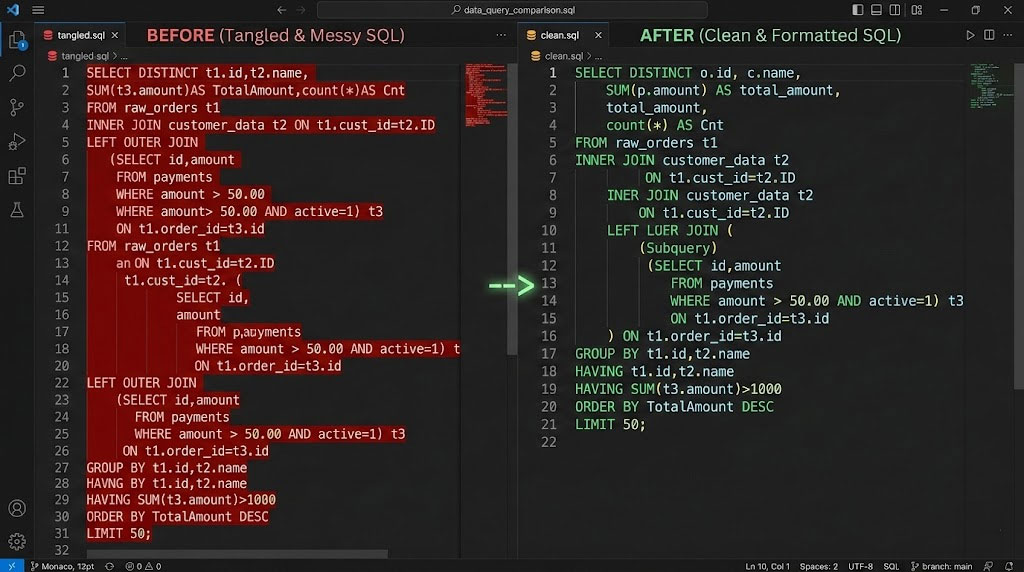
The best way to understand the impact of SQL formatting is to see real examples side by side. Below are three common query patterns — a basic SELECT, a multi-table JOIN, and a CTE — shown first in unformatted form and then after applying proper formatting rules.
Example 1: Basic SELECT query
-- BEFORE: Hard to scan
select id,name,email,signup_date from users where status='active' and signup_date>='2025-01-01' order by signup_date desc limit 50;

-- AFTER: Clean and readable
SELECT
    id,
    name,
    email,
    signup_date
FROM users
WHERE status = 'active'
    AND signup_date >= '2025-01-01'
ORDER BY signup_date DESC
LIMIT 50;
Example 2: Multi-table JOIN
-- BEFORE: Where does one table end and another begin?
select o.id,c.name,p.product_name,oi.quantity,oi.price from orders o join customers c on o.customer_id=c.id join order_items oi on o.id=oi.order_id join products p on oi.product_id=p.id where o.created_at>='2025-01-01' and o.status='shipped' order by o.created_at desc;

-- AFTER: Each relationship is clearly visible
SELECT
    o.id,
    c.name,
    p.product_name,
    oi.quantity,
    oi.price
FROM orders AS o
INNER JOIN customers AS c
    ON o.customer_id = c.id
INNER JOIN order_items AS oi
    ON o.id = oi.order_id
INNER JOIN products AS p
    ON oi.product_id = p.id
WHERE o.created_at >= '2025-01-01'
    AND o.status = 'shipped'
ORDER BY o.created_at DESC;
Example 3: Common Table Expression (CTE)
-- BEFORE: Nearly impossible to follow
with monthly_revenue as (select customer_id,date_trunc('month',order_date) as month,sum(total) as revenue from orders where status='completed' group by customer_id,date_trunc('month',order_date)),top_customers as (select customer_id,sum(revenue) as total_revenue from monthly_revenue group by customer_id having sum(revenue)>10000) select c.name,t.total_revenue from customers c join top_customers t on c.id=t.customer_id order by t.total_revenue desc;

-- AFTER: Each CTE is a clear, named building block
WITH monthly_revenue AS (
    SELECT
        customer_id,
        DATE_TRUNC('month', order_date) AS month,
        SUM(total) AS revenue
    FROM orders
    WHERE status = 'completed'
    GROUP BY customer_id, DATE_TRUNC('month', order_date)
),
top_customers AS (
    SELECT
        customer_id,
        SUM(revenue) AS total_revenue
    FROM monthly_revenue
    GROUP BY customer_id
    HAVING SUM(revenue) > 10000
)
SELECT
    c.name,
    t.total_revenue
FROM customers AS c
INNER JOIN top_customers AS t
    ON c.id = t.customer_id
ORDER BY t.total_revenue DESC;
You can paste any of these unformatted examples into our SQL Formatter to see the transformation happen instantly. It is a fast way to clean up inherited queries or to check whether your manual formatting follows standard conventions.
How to Format SQL Online Using Our SQL Formatter
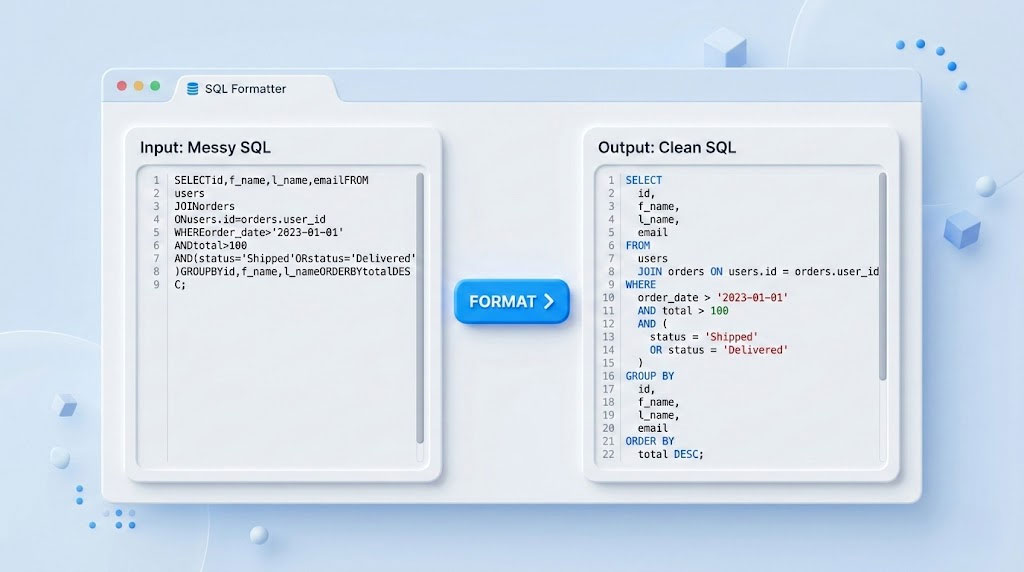
Manual formatting works well for new queries you write from scratch, but what about existing queries? Legacy codebases, exported queries from database tools, and SQL generated by ORMs often come out as dense, unformatted blocks. That is where an online SQL formatter becomes essential.
Our SQL Formatter at html-editor-online.com handles this in seconds. Here is how to use it:
Step 1: Paste your SQL. Open the SQL Formatter and paste your unformatted query into the input area. The tool accepts queries of any length and complexity, from simple SELECTs to multi-CTE analytical queries.
Step 2: Click Format. The formatter instantly applies standard formatting rules: uppercase keywords, proper indentation, each clause on its own line, and aligned columns. The output is clean, readable SQL that follows widely accepted conventions.
Step 3: Copy the result. Copy the formatted SQL and paste it back into your editor, migration script, documentation, or pull request. The entire process takes less than five seconds.
The tool runs entirely in your browser — your SQL is never sent to a server, which makes it safe to use with production queries and sensitive data. It supports standard SQL syntax used across MySQL, PostgreSQL, SQL Server, Oracle, and SQLite.
If you work with other languages alongside SQL, html-editor-online.com offers similar formatting and beautifying tools for your full stack. You can clean up API response data with the JSON Formatter, fix indentation in configuration files with the YAML Formatter, or expand minified production code with the JavaScript Beautifier, CSS Beautifier, or HTML Beautifier.
Common SQL Formatting Mistakes and How to Fix Them
Even developers who understand the importance of clean code often fall into patterns that reduce SQL readability. Knowing how to format SQL is only half the battle — you also need to recognize and avoid these common mistakes.
Using SELECT * in production queries. Writing SELECT * retrieves every column from a table, which is convenient for quick exploration but harmful in production. It hides which columns the query actually needs, makes the query fragile when table schemas change, and can degrade performance by pulling unnecessary data. Always list the specific columns you need.
Inconsistent keyword casing. Mixing SELECT with from and Where in the same query creates visual noise. Pick a convention — uppercase keywords is the most widely adopted — and apply it consistently throughout every query. If you frequently inherit queries with inconsistent casing, running them through our SQL Formatter will normalize casing automatically.
Cramming everything onto one line. This is the most destructive formatting mistake. A 200-character single-line query might work for the database engine, but it fails for every human who needs to read it. Break queries into multiple lines with proper clause separation.
Missing explicit JOIN types. Writing just JOIN instead of INNER JOIN, LEFT JOIN, or RIGHT JOIN forces readers to assume the join type. While JOIN defaults to INNER JOIN in most databases, being explicit removes ambiguity and makes the query self-documenting.
No spacing around operators. Writing WHERE price>100 AND quantity>=5 is harder to scan than WHERE price > 100 AND quantity >= 5. Add spaces around comparison operators, equal signs, and arithmetic operators for clarity.
Over-commenting obvious code. Comments like -- Select the customer name above SELECT customer_name add clutter without value. Reserve comments for explaining business logic, workarounds, or non-obvious filter conditions.
SQL Formatting Across Different Database Systems
The core formatting rules — uppercase keywords, clause-per-line, proper indentation — apply universally. However, different database systems have unique syntax features that benefit from specific formatting attention. The table below highlights key formatting considerations for the most popular database platforms.
| Database System | Market Share (2024) | Formatting Consideration |
|---|---|---|
| PostgreSQL | 49% of developers | Format CTEs and window functions generously — PostgreSQL queries tend to be complex analytical queries. Use double quotes only for case-sensitive identifiers. |
| MySQL | 40% of developers | Backtick-quoted identifiers (`table_name`) should be used sparingly and only when necessary. Format LIMIT clauses on their own line. |
| SQL Server | 25% of developers | Format TOP clauses inline with SELECT. Use square brackets for reserved words. Indent stored procedure blocks clearly. |
| SQLite | 33% of developers | Format PRAGMA statements separately from data queries. SQLite-specific functions like datetime() should be treated like any built-in function. |
| Oracle | 11% of developers | Format ROWNUM filters clearly in WHERE clauses. Oracle-specific syntax like CONNECT BY requires careful indentation to show hierarchy. |
Source: Market share figures from the 2024 Stack Overflow Developer Survey, professional developers.
Regardless of which database you use, the fundamental goal remains the same: make the query’s intent visible through its structure. Our SQL Formatter produces output that is compatible with all major database systems, so you can use it whether your stack runs on PostgreSQL, MySQL, or SQL Server.
SQL Formatting in Team Workflows and Code Reviews
The need to format SQL consistently becomes even more critical in team environments. When multiple developers contribute queries to a shared codebase — whether through migration files, stored procedures, or application code — inconsistent formatting creates friction in code reviews and increases the risk of merge conflicts.
Here are practical strategies for maintaining consistent SQL formatting across a team:
Establish a team SQL style guide. Document your formatting conventions in a shared location. Cover keyword casing, indentation size, comma placement (leading vs. trailing), alias conventions, and comment style. Reference established guides like the SQL Style Guide by Simon Holywell as a starting point and customize it to your team’s preferences.
Use a formatter as the standard. Rather than debating style in every pull request, agree on a formatter and run all SQL through it before committing. Point your team to our online SQL formatter as a quick, browser-based option that requires no setup or installation.
Format SQL in migration files. Database migration files written in tools like Flyway, Liquibase, or Django ORM often contain raw SQL. Apply the same formatting standards to migration SQL as you would to application queries. Future developers who read these files will thank you.
Include SQL formatting in code review checklists. Add SQL readability as a specific item in your team’s code review checklist, alongside things like test coverage and error handling. A quick check for proper keyword casing, clause separation, and meaningful aliases catches formatting issues before they reach the main branch.
When to Use an Online SQL Formatter vs. Manual Formatting
Both approaches have their place. Understanding when to reach for an automated tool versus formatting by hand helps you work more efficiently.
| Scenario | Best Approach | Why |
|---|---|---|
| Cleaning up inherited or legacy SQL | Online SQL Formatter | Instantly normalizes inconsistent formatting across dozens of queries without manual effort. |
| Formatting ORM-generated queries for debugging | Online SQL Formatter | ORMs like Django and Hibernate output dense single-line SQL. A formatter makes these readable for debugging. |
| Writing new queries from scratch | Manual formatting | Formatting as you write helps you think through query structure and catches logical errors early. |
| Preparing SQL for documentation or blog posts | Online SQL Formatter | Ensures consistent, professional presentation without spending time on manual alignment. |
| Optimizing complex analytical queries | Both | Start with an automated format, then manually adjust indentation for deeply nested CTEs and subqueries. |
For most everyday tasks, the SQL Formatter handles formatting instantly. For highly customized or team-specific formatting conventions, use the formatter as a baseline and make manual adjustments where needed.

FAQ: Format SQL
What does it mean to format SQL?
To format SQL means to structure a query with consistent indentation, uppercase keywords, proper line breaks between clauses, and meaningful spacing. Formatting does not change what the query does — the database engine treats formatted and unformatted SQL identically. The purpose is to make the query easier for humans to read, understand, debug, and maintain.
Does SQL formatting affect query performance?
No. SQL formatting is purely cosmetic from the database engine’s perspective. Whitespace, line breaks, indentation, and keyword casing have zero impact on execution plans or query speed. The database parser strips all formatting before processing. Formatting benefits developers exclusively — it improves readability, reduces errors, and speeds up code reviews without any performance cost.
What is the best SQL formatting standard to follow?
There is no single official standard, but the most widely referenced guides include the SQL Style Guide by Simon Holywell and Devart’s SQL formatting best practices. Both recommend uppercase keywords, one clause per line, consistent indentation, and meaningful aliases. The most important thing is picking a standard and applying it consistently across your team or project.
Should SQL keywords be uppercase or lowercase?
Uppercase is the dominant convention in the SQL community. Writing keywords like SELECT, FROM, WHERE, and JOIN in uppercase visually separates them from table and column names, which improves readability. Some modern style guides argue that lowercase is acceptable since syntax highlighting in modern editors handles the distinction, but uppercase remains the safer default for code shared across different contexts — documentation, wikis, Slack messages, and code reviews — where syntax highlighting is not always available.
Is it safe to use an online SQL formatter with production queries?
It depends on the tool. Our SQL Formatter processes everything client-side in your browser — your SQL is never transmitted to a server. This makes it safe for use with production queries containing real table names and business logic. For tools that process SQL server-side, exercise caution with sensitive queries and check the provider’s privacy policy.
Should I use leading or trailing commas in SQL?
Both are valid. Trailing commas (placing the comma at the end of each line) are more common in general software development and feel natural to most programmers. Leading commas (placing the comma at the start of each new line) are popular in the analytics and data engineering community because they make it easier to spot a missing comma and allow you to comment out individual columns without syntax errors. Choose whichever convention your team agrees on and apply it consistently.
How do I format SQL with subqueries and CTEs?
For subqueries, open the parenthesis on the same line as the clause that introduces it, indent the subquery body one level deeper, and close the parenthesis at the original indentation level. For CTEs, place each WITH clause name on its own line, indent the CTE body, and separate multiple CTEs with a comma and a blank line. This structure makes it easy to read each CTE as an independent, named block of logic — similar to how you would read a series of function definitions.
Can I format SQL for MySQL, PostgreSQL, and SQL Server with the same tool?
Yes. Standard SQL formatting rules — keyword casing, line breaks, indentation — apply across all major database systems. Our SQL Formatter handles standard SQL syntax that works with MySQL, PostgreSQL, SQL Server, Oracle, and SQLite. Database-specific extensions like SQL Server’s TOP or PostgreSQL’s :: casting syntax are preserved during formatting.
Start Writing Cleaner SQL Today
Well-formatted SQL is not about aesthetics — it is a practical skill that reduces debugging time, improves collaboration, and makes your codebase more maintainable. The rules are straightforward: uppercase keywords, one clause per line, consistent indentation, meaningful aliases, and purposeful comments. Apply these consistently and your queries will be easier to read, review, and modify.
For quick formatting tasks, paste your SQL into our free SQL Formatter and get clean, properly structured output in seconds. It works directly in your browser with no sign-up required, and your queries stay completely private.
If you work with more than just SQL, explore the full set of free online web development tools available on the platform — from JSON formatting and XML formatting to HTML beautifying and CSS minification. Clean code starts with the right tools.
Related reading:
- Free Online Web Development Tools: Every Editor, Formatter, Validator, and Converter You Need
- 5 Must-Know Tips for Formatting JSON Like a Pro
- Online JSON Editor: The Complete Guide to Editing JSON in Your Browser
- HTML Editors: A Comprehensive Guide to Choosing the Best Tool
- The Importance of CSS Editors in Modern Web Development
Sources: Stack Overflow Developer Survey 2024, SQL Style Guide by Simon Holywell, Devart SQL Formatting Best Practices, LearnSQL.com SQL Formatting Standard







Comments