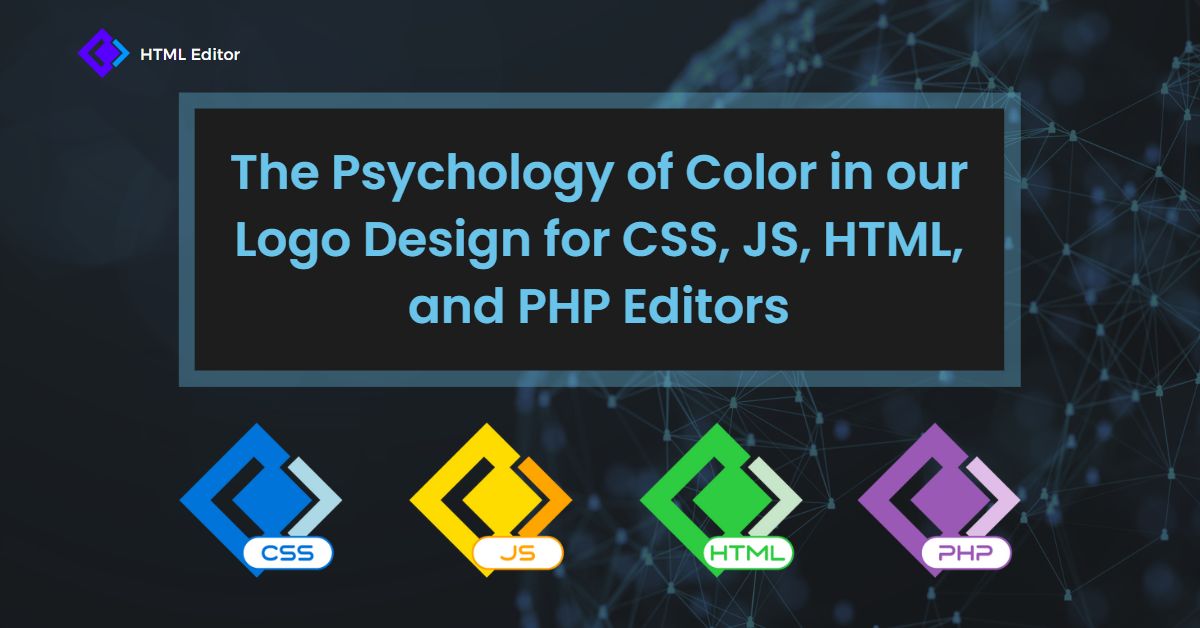
Every developer tool makes a first impression before a single line of code is written. The colors in a code editor branding strategy shape how users perceive reliability, creativity, and technical capability — often within seconds. Research published in the Journal of Marketing & Social Research (2025) found that color influences brand recognition by up to 80% and that 62–90% of initial product judgments are based on color alone. For developer tools and code editors, where trust, precision, and usability are paramount, getting the color palette right is not a cosmetic decision — it is a strategic one.
At html-editor-online.com, we put serious thought into code editor branding when designing the logos for our CSS, JavaScript, HTML, and PHP editors. In this guide, we explore the psychology behind each color choice, examine how leading technology brands use color strategically, and explain how these principles can help web developers and designers make smarter branding decisions for their own projects.
Table of Contents
Why Color Matters in Code Editor Branding
Developers spend hours each day inside code editors. The visual identity of a tool — from the logo on the desktop to the favicon in the browser tab — communicates something before the user even opens a file. Effective code editor branding establishes credibility, communicates purpose, and creates a memorable identity in a crowded marketplace of developer tools.
According to research from the Colorcom Institute, people make subconscious judgments about a product within 90 seconds of initial viewing, and between 62% and 90% of that assessment is based on color alone. For a code editor competing against dozens of similar tools, the right color strategy helps the product stand out, feel trustworthy, and align with the expectations of its target audience.
This is why we took a research-driven approach when designing logos for each of our specialized editors. Whether you are building a WYSIWYG editor, launching a developer tool, or establishing a brand identity for a web application, understanding color psychology gives you a competitive advantage.
The Science Behind Color Psychology
Color psychology is the study of how colors influence human emotions, behaviors, and perceptions. In the context of developer tool branding specifically, this field examines how different hues trigger psychological and physiological responses that affect decision-making, mood, and even productivity.
The scientific foundations go deeper than many marketers realize. The American Psychological Association published research in the Journal of Experimental Psychology (2002) demonstrating that color helps humans process and store visual information more efficiently. Color adds an additional cognitive “tag” to visual scenes, making them easier to remember. This principle directly applies to logo design — a distinctively colored logo is more memorable than a monochromatic one.
How Color Builds Brand Recognition in Technology
Brand recognition in the technology sector is heavily influenced by color consistency. A Reboot survey found that 78% of participants could recall a logo’s primary color after just 10 minutes of study — nearly double the number who could recall the company name. For developer tools and code editors, this means your color palette may be more memorable than your product name.
Research from the University of Loyola, Maryland suggests that consistent use of signature colors can increase brand recognition by up to 80%. This is particularly relevant for code editor branding, where tools like Visual Studio (purple), Sublime Text (orange-gold), and Atom (green) have become instantly recognizable through their color identities alone.
Color and Purchasing Decisions: What the Data Shows
The commercial impact of color choices is substantial. According to data compiled by Straits Research, 85% of consumers cite color as a primary factor in choosing one product over another, and 93% of consumers base their purchasing decisions on visual appearance. In the developer tools market, where many editors offer similar core functionality, visual identity and branding become key differentiators.
Blue is used by 33% of the world’s top brands, followed by black or grayscale at 28%, red at 23.4%, and yellow or gold at 15.6%. Green appears in 5.5% of top brand logos, while purple accounts for just 0.8% — making it a distinctive choice for any brand seeking to stand apart from the competition.
How Top Technology Brands Use Color in Their Logos
Before diving into our specific editor brand identity decisions, it helps to understand how the broader technology industry approaches color. According to a brand analysis by DeSantis Breindel (2025), more than 50% of the top 100 technology brands include medium-to-dark blue or black in their logos. But the landscape is more nuanced than simply defaulting to blue.
Blue: The Dominant Color in Tech Branding
Blue appears in more technology logos than any other color. Companies like IBM, Dell, HP, Intel, and Facebook all rely on blue to communicate stability, reliability, and professionalism. A 2024 study from Atom.com found that 49% of consumers associate blue with a feeling of calm — a desirable trait for tools that developers depend on daily. Blue’s dominance in tech branding stems from both its calming psychological properties and its early adoption by corporate technology pioneers who wanted to appear dependable rather than disruptive.
Yellow: Creativity and Optimism
Yellow communicates energy, intellect, and optimism. It activates the creative centers of the brain and is highly visible, which is why brands like Snapchat, DHL, and IKEA leverage it. In developer contexts, JavaScript’s unofficial yellow branding has become so iconic that the color is nearly synonymous with the language itself. Yellow is an excellent choice for tools that emphasize creativity, speed, and interactive experiences.
Green: Growth, Balance, and Progress
Green represents nature, renewal, and growth — but in technology contexts, it also signals progress and stability. Android’s green logo communicates development and advancement. Brands like Spotify and Evernote use green to suggest freshness and forward momentum. For foundational technologies like HTML, green reinforces the idea of structural stability and continuous growth.
Purple: Sophistication and Forward-Thinking
Purple combines the stability of blue with the energy of red, creating associations with sophistication, wisdom, and innovation. It is the rarest color in top brand logos — only 0.8% of leading brands use it — which gives it strong differentiation potential. In the technology space, companies like Twitch, Slack (partially), and Visual Studio use purple to position themselves as creative and forward-thinking. Purple has emerged as what some brand strategists call a “leadership color” for technology innovators.
Our Code Editor Branding Choices Explained
When designing the logos for our suite of online editors, we approached logo color selection for our editors with the same research-driven methodology outlined above. Each editor serves a distinct purpose within web development, and we wanted the color to reflect both the function of the tool and the psychology of its target audience.
CSS Editor: Why We Chose Blue
For the CSS editor logo, we selected a shade of blue that conveys technology, creativity, and dependability. CSS is the language responsible for the visual presentation of the web — it controls layout, typography, colors, and responsive design. Developers who work with CSS need a tool that feels both creative and precise.
Blue was the natural choice because it bridges these qualities. It is associated with trustworthiness, intelligence, and professionalism, while lighter or brighter shades also suggest creativity and modernity. Our specific shade of blue aligns with the broader technology sector’s reliance on this color while differentiating itself through tone and context. Understanding the importance of CSS in web development reinforced our belief that the tool’s branding should communicate both reliability and creative capability.
JavaScript Editor: Why We Chose Yellow

For the JavaScript editor logo, we opted for yellow — the color most strongly associated with innovation, energy, and optimism. JavaScript is the language that powers interactivity on the web. It transforms static pages into dynamic applications, handles real-time data, and enables everything from simple form validation to complex single-page applications.
Yellow reflects this dynamic nature. It represents intellect, enthusiasm, and forward momentum. The choice also aligns with the JavaScript community’s unofficial color identity — the iconic yellow and black of the JS logo created by Chris Williams has become one of the most recognizable symbols in web development. By adopting yellow for our JavaScript editor, we tap into an existing color association while reinforcing the tool’s identity as an energetic, modern coding environment.
HTML Code Editor: Why We Chose Green
For the HTML code editor logo, we chose green to convey growth, balance, and structural stability. HTML is the foundational markup language of the web — every website starts with HTML. It provides the structure and semantic content that all other technologies build upon.
Green communicates exactly this foundational role. It is associated with nature, harmony, and progress, which parallels HTML’s position as the bedrock of web development. The color also signals renewal and continuous improvement, reflecting the ongoing evolution of the HTML standard. Whether you are learning to avoid common HTML coding mistakes or building complex web structures, the green branding reinforces that our HTML editor is a stable, growth-oriented tool.
PHP Editor: Why We Chose Purple

For the PHP editor logo, we selected purple to communicate sophistication, creativity, and technical depth. PHP powers approximately 76% of websites with a known server-side language (according to W3Techs), making it one of the most widely deployed programming languages in the world. Platforms like WordPress, Drupal, and Laravel all run on PHP.
Purple was a deliberate choice because it combines the trust and stability of blue with the energy and passion of red. It signals innovation, wisdom, and a willingness to think differently. With fewer than 1% of top brands using purple, it also provides strong visual differentiation. The color aligns with PHP’s real-world role: a powerful, mature technology that quietly drives the majority of the web. The official PHP logo itself uses shades of purple and blue, creating a natural association that our branding reinforces.
Code Editor Color Comparison at a Glance
The following table summarizes our editor color strategy and the psychology behind each choice:
| Editor | Color | Primary Psychological Associations | Why It Fits the Language |
|---|---|---|---|
| CSS Editor | Blue | Trust, intelligence, creativity, professionalism | CSS controls visual presentation — requires both precision and creative vision |
| JS Editor | Yellow | Energy, optimism, innovation, intellect | JavaScript powers interactivity — demands enthusiasm and dynamic thinking |
| HTML Editor | Green | Growth, balance, harmony, stability | HTML is the structural foundation of the web — embodies stability and progress |
| PHP Editor | Purple | Sophistication, wisdom, innovation, depth | PHP powers the server side — represents technical sophistication and maturity |
How to Apply Color Psychology to Your Web Development Projects
Understanding color psychology is not just useful for major brands — it is directly applicable to any web development or design project. Whether you are building a personal portfolio, launching a SaaS product, or designing an HTML editor, the principles of developer tool color strategy can guide your color decisions.
Step 1: Define Your Brand Personality First
Before selecting colors, identify the primary emotions you want your brand to evoke. Stanford professor Jennifer Aaker’s research identifies five core brand personality dimensions: sincerity, excitement, competence, sophistication, and ruggedness. Each dimension aligns with different color families. For a code editor that wants to convey competence and reliability, blue or green may be appropriate. For one targeting creative professionals, yellow or orange could work better.
Step 2: Consider Your Target Audience
Developer tool audiences have specific expectations. Professional developers working with enterprise tools tend to prefer more conservative palettes (blues, grays, dark themes). Creative developers and designers often respond to bolder, more expressive color choices. Hobbyist and beginner audiences may prefer warmer, more approachable colors. Research your competitors’ color choices and consider whether you want to align with category expectations or deliberately differentiate yourself.
Step 3: Test Across Digital Contexts
A logo color that looks excellent on a white background may lose impact on a dark IDE theme or a small browser favicon. Test your branding across all the contexts where users will encounter it: desktop icons, browser tabs, app stores, documentation sites, social media previews, and within the editor interface itself. Accessibility testing is equally important — ensure sufficient contrast ratios between your brand colors and their backgrounds.
Step 4: Implement Consistently with CSS Variables
Once you have established your brand colors, implement them consistently across your product using CSS custom properties. This approach ensures brand consistency while making future updates straightforward:
:root {
  /* Primary brand color */
  --brand-primary: #3498db;
  --brand-primary-light: #5dade2;
  --brand-primary-dark: #2171a6;

  /* Semantic colors derived from brand */
  --color-trust: var(--brand-primary);
  --color-action: #f39c12;
  --color-success: #27ae60;
  --color-accent: #8e44ad;
}

.editor-header {
  background-color: var(--brand-primary);
  color: #ffffff;
}

.editor-button-primary {
  background-color: var(--brand-primary);
  border: 2px solid var(--brand-primary-dark);
  transition: background-color 0.2s ease;
}

.editor-button-primary:hover {
  background-color: var(--brand-primary-dark);
}
This methodology ensures that your brand color system remains cohesive across every component. If you are working with CSS regularly, our online CSS editor makes it easy to experiment with brand color palettes in real time. You can also use our CSS beautifier to keep your stylesheets clean and organized as your brand design system grows.
Common Mistakes in Code Editor Branding and Logo Color Selection
Even well-intentioned branding efforts can go wrong. Here are the most common pitfalls to avoid when making logo color decisions for developer tools:
Choosing colors based solely on personal preference. Your favorite color may not align with the emotional response your target audience needs. Always let research and brand strategy guide your decisions rather than subjective taste.
Ignoring competitor analysis. If every competitor in your space uses blue, defaulting to blue makes your product blend in rather than stand out. Study what exists in the market before choosing your palette.
Using too many colors. Most effective technology brands use one or two primary colors. Adding too many hues creates visual confusion and dilutes brand recognition. The 60-30-10 rule — 60% dominant color, 30% secondary, and 10% accent — provides a reliable framework.
Neglecting dark mode compatibility. With the majority of developers preferring dark themes in their code editors, a logo that only works on light backgrounds is a significant limitation. Design your branding to function effectively in both light and dark contexts.
Forgetting about cultural context. Colors carry different meanings across cultures. If your tool targets a global developer audience, research how your chosen colors are perceived in different regions. White signifies purity in Western cultures but mourning in some East Asian traditions. Red means prosperity in China but danger in many Western contexts.
Color Accessibility: An Essential Branding Consideration
An often-overlooked aspect of branding for developer tools is color accessibility. Approximately 1 in 12 men and 1 in 200 women experience some form of color blindness. If your brand relies exclusively on color to convey meaning — without shape, text, or contrast differences — a significant portion of your audience may struggle to identify your tool.
The Web Content Accessibility Guidelines (WCAG) recommend a minimum contrast ratio of 4.5:1 for normal text and 3:1 for large text. When designing your code editor brand identity, ensure your logo meets these thresholds against common backgrounds. Tools like the WebAIM Contrast Checker make this verification straightforward.
For your application interfaces, apply these principles using proper HTML and CSS. Our visual WYSIWYG editor allows you to preview how color choices look in real rendered HTML, which is helpful for testing accessibility before deploying design changes.
FAQ: Code Editor Branding and Color Psychology
Why do most technology companies use blue in their logos?
Blue is the most universally liked color and is associated with trust, stability, and professionalism. More than 50% of the top 100 technology brands include blue in their logos. Early tech companies like IBM and HP adopted blue to signal reliability, and this association has been reinforced for decades. Blue also performs well on digital screens and conveys calm competence — qualities that are essential for software products that users depend on daily.
How do I choose the right color for my developer tool or code editor?
Start by defining your brand personality using a framework like Jennifer Aaker’s five dimensions (sincerity, excitement, competence, sophistication, ruggedness). Then analyze your competitors’ color choices to identify opportunities for differentiation. Match your chosen color to the emotional response you want to create in your target audience, and test across multiple digital contexts including dark mode, favicons, and social media previews.
Does color really affect how users perceive a code editor?
Yes. Research consistently shows that consumers make initial product judgments within 90 seconds, with 62–90% of that assessment based on color alone. For code editors, the logo and brand colors influence perceived trustworthiness, professionalism, and quality — even before the user evaluates the tool’s features or performance.
Can a code editor brand use multiple colors effectively?
Absolutely. Companies like Google and Microsoft use multiple primary colors to signal diversity and broad capability. However, multi-color logos work best for platforms offering a wide range of products. For a single-purpose code editor, a focused one or two-color palette typically creates stronger brand recognition and clearer emotional associations.
How should editor brand colors adapt for dark mode interfaces?
Design your logo and brand colors to work on both light and dark backgrounds. This often means creating light and dark variants of your logo, using colors with sufficient inherent brightness or saturation, and avoiding colors that become invisible against common dark theme backgrounds (#1e1e1e or #282c34). Test your branding in popular developer environments to ensure visibility.
How can I implement color psychology principles in my CSS?
Use CSS custom properties (variables) to define a brand color system rooted in psychological principles. Start with a primary color that aligns with your desired brand emotion, then build semantic color tokens (trust, action, success, warning) that reference your palette. Apply the 60-30-10 rule for balance: 60% dominant neutral, 30% secondary brand color, and 10% accent color for calls to action and highlights.
Should I change my code editor’s branding color if my competitors use the same one?
Not necessarily — context matters more than the color itself. The same shade of blue can communicate very different things depending on logo shape, typography, and overall brand positioning. However, if your tool is consistently confused with a competitor, exploring a different shade or an entirely different hue can help establish a distinct identity. Research from brand strategists at Focus Lab suggests that shifting blue to a secondary role and leading with a bolder color can help tech brands break through in a saturated market.
Make Strategic Color Choices for Your Code Editor Brand
Color is one of the most powerful yet underutilized tools in code editor branding. The right color creates trust, communicates purpose, and builds lasting recognition — all before the user writes a single line of code. At html-editor-online.com, our color choices for the CSS, JavaScript, HTML, and PHP editors were not arbitrary — they were grounded in research, audience understanding, and strategic differentiation.
Whether you are building your own developer tool, designing a blog, or simply curious about why your favorite tools look the way they do, understanding color psychology gives you a significant advantage. Start with the science, validate with your audience, and execute with consistency. Your code editor’s brand — and your users’ first impression — will be stronger for it.
Related reading:
- What Is a WYSIWYG Editor? Complete Guide to Visual Content Creation
- HTML Editors: A Comprehensive Guide
- HTML Editor: The Search Is Over — Find the Right Tool for Your Workflow
- The Importance of CSS in Web Development: Using an Online CSS Editor
- Why Is a WYSIWYG Editor Important? The Complete Guide
Sources: Journal of Marketing & Social Research (2025); Colorcom Institute — “Why Color Matters”; University of Loyola, Maryland — brand recognition study; Straits Research — “Influence of Colors on Brand Recognition and Consumer Behavior”; DeSantis Breindel — “Technology Brand Colors” (2025); W3Techs — server-side language usage statistics; Reboot — logo recall survey; American Psychological Association — Journal of Experimental Psychology (2002); Jennifer Aaker, Stanford University — “Dimensions of Brand Personality”; Focus Lab — B2B tech brand color analysis (2025); Atom.com — consumer color association study (2024); WebAIM — contrast accessibility guidelines.



Comments